
GitLab CI/CD
Bitwarden provides a way to inject secrets into your GitLab CI/CD pipelines using the Bitwarden Secrets Manager CLI. This allows your to securely store and use secrets in your CI/CD workflows. To get started:
Save an access token
In this step, we’re going to save an access token as a GitLab CI/CD variable. This token will be used to authenticate with the Bitwarden Secrets Manager API and retrieve secrets.
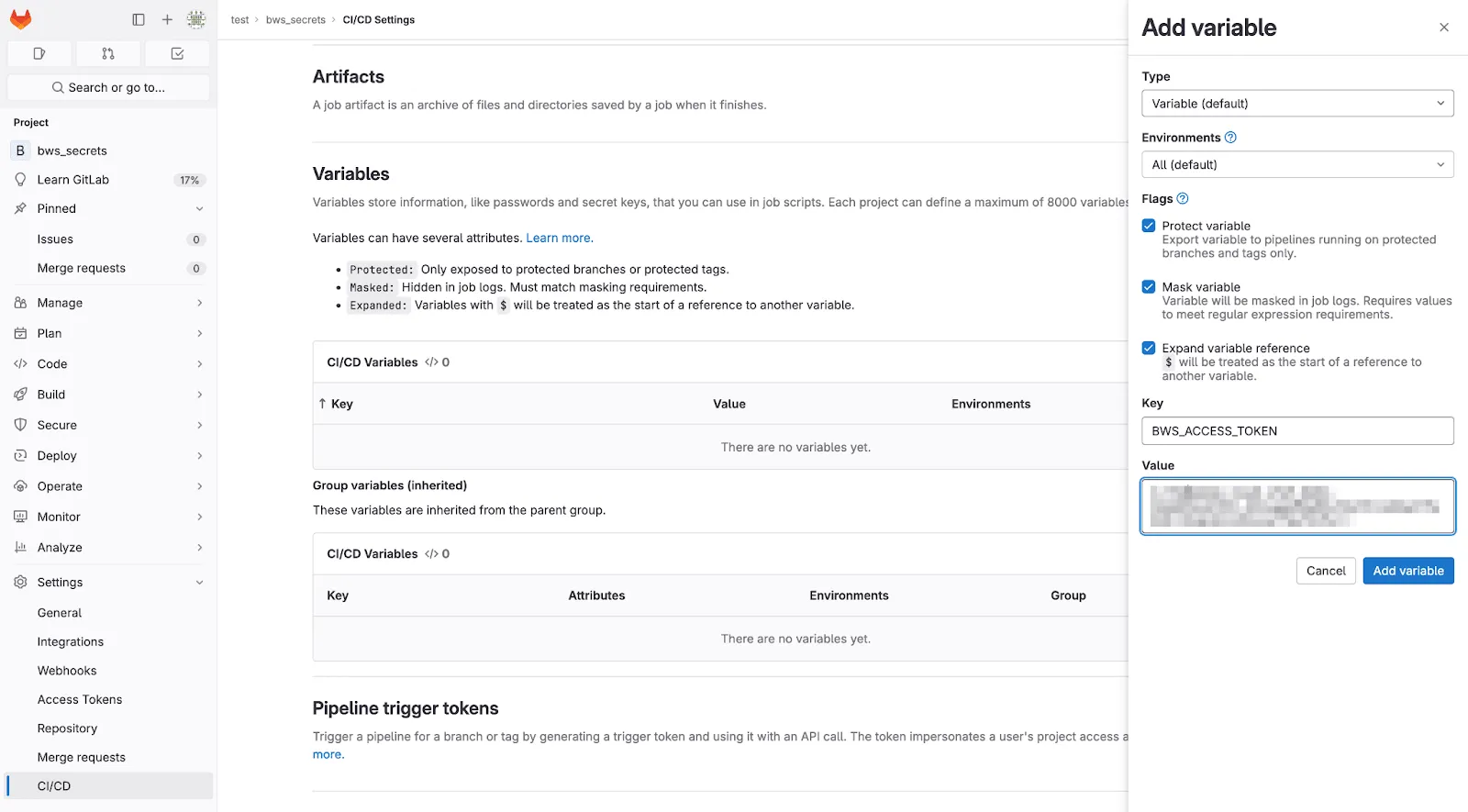
- In GitLab, navigate to your project’s Settings → CI/CD page.
- Select Expand in the Variables section.
- Select Add variable.
- Check the Mask variable flag.
- Name the key
BWS_ACCESS_TOKEN. This is the variable that the Secrets Manager CLI looks for to authenticate. Alternatively, if you need to name the key something else, specify--access-token NAME_OF_VARon thebws secret getline later. - In another tab, open the Secrets Manager web app and create an access token.
- Back in GitLab, paste the newly-created access token into the Value field.
- Select Add variable to save.
Add to your workflow file
Next, we’re going to write a rudimentary GitLab CI/CD workflow. Create a file called .gitlab-ci.yml in the root of your repository with the following contents:
stages:- default_runner
image: ubuntubuild:  stage: default_runner  script:  - |    # install bws    apt-get update && apt-get install -y curl git jq unzip    export BWS_VER="$(      curl -s https://api.github.com/repos/bitwarden/sdk/releases/latest | \      jq -r '.tag_name' | sed 's/bws-v//'    )"    curl -LO \      "https://github.com/bitwarden/sdk/releases/download/bws-v$BWS_VER/bws-x86_64-unknown-linux-gnu-$BWS_VER.zip"    unzip -o bws-x86_64-unknown-linux-gnu-$BWS_VER.zip -d /usr/local/bin
    # secrets to retrieve    secret_ids=(      "534cc788-a143-4743-94f5-afdb00a40a41"      "9a0b500c-cb3a-42b2-aaa2-afdb00a41daa"    )
    # export secrets as environment variables    for secret_id in "${secret_ids[@]}"; do      secret="$(bws secret get "$secret_id")"      secret_key="$(echo "$secret" | jq -r '.key')"      secret_value="$(echo "$secret" | jq -r '.value')"      export "$secret_key"="$secret_value"    done
  # run the command that requires secrets  - npm run start
Where:
-
BWS_VERis the version of the Bitwarden Secrets Manager CLI to install. Here, we are automatically getting the latest version. You can pin the version being installed by changing this to a specific version, for exampleBWS_VER="0.3.1". -
534cc788-a143-4743-94f5-afdb00a40a41and9a0b500c-cb3a-42b2-aaa2-afdb00a41daaare reference identifiers for secrets stored in Secrets Manager. The machine account that your access token belongs to must be able to access these specific secrets. -
npm run startis the command that expects the secret values that are retrieved bybws. Replace this with the relevant commands for running your project.
Run the CI/CD pipeline
On the left, select Build → Pipelines and select Run pipeline at the top-right of the pace. Select Run pipeline on the page to run the newly-created pipeline.